Your first Blackbox drive: capture useful evidence
Start with an ordinary drive after the bench checks. The aim is to establish that your NEO-M9N installation produces interpretable, recoverable data. No hard acceleration, braking tests or timed public-road driving is needed.
Before you leave
- Download a full backup of existing browser recordings and tracks. Keep it outside browser storage.
- Confirm the controller is the supported ESP32-C3 build and choose the NEO-M9N release image. Record the version and checksum. Check the actual board's USB arrangement before attaching the IMU; the default GPIO18/19 UART assignment conflicts with active C3 native USB.
- Secure the enclosure, antenna, wiring and phone. Photograph the sensor axes and antenna position while parked. Configure the UI before driving.
- Keep the sensor upright and parallel to the car floor; a sloping dash may need a rigid support. Non-horizontal mounting remains R&D. Use level ground for the first stationary startup baseline. The modest-incline arithmetic has software tests; a driveway comparison is a later parked validation step.
- Choose one phone/browser as the primary recorder. Keep that dashboard foregrounded, powered and unlocked. A Home Screen launch may use different browser storage; test recovery before relying on it.
Parked, outdoors
- Wait for fresh GPS. Capture Diagnostics showing delivered GPS/IMU rates and satellite information. A 25 Hz firmware target is not a delivered-rate result.
- Press Record session and confirm REC. Record roughly two minutes stationary, giving us a baseline for speed/forces and receiver cadence.
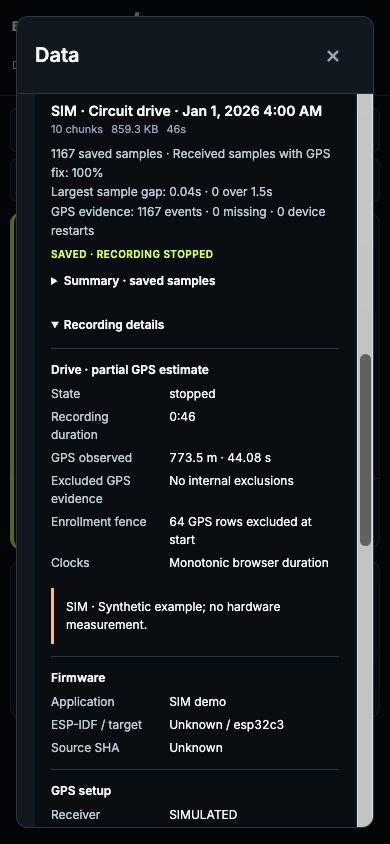
- With no selected track, the Drive panel shows recording duration and partial GPS observed distance. Distance starts unavailable until qualified receiver intervals arrive; it does not guess missing spans. Check that data is saving. Do not clear an unfinished-recording notice by deleting storage; Saved data contains the retained chunks.
During the ordinary drive
Leave the interface alone. Changing Speed/G-meter/Peaks/Runs does not control which data is recorded or which rolling detectors run. Missing interval results are normal if an ordinary trip never supplies the required thresholds and lead-in evidence.
A nearby saved track may appear in a separate suggestion row. It does not arm timing or start recording. Dismiss suppresses that track until this page reloads; an untouched suggestion expires and waits before returning. Review or activate it while parked. Suggestions withdraw when GPS is stale or track setup changes.
A passenger may note approximate times of a disconnect, unexpected value or missed start. Otherwise make notes only after stopping. Keep the phone foregrounded; screen lock or background suspension can create collection gaps.
Recording a route and timing a stage are separate operations. For an initial long highway trip, ordinary session logging is enough. Controlled start/finish testing can follow after the basic capture is sound.
Parked at the end
Record another short stationary segment. Stop recording: Drive duration and distance freeze immediately, while final saving may still finish. Wait for saving, then open Saved data:
- Expand Summary · saved samples. Note maximum speed, qualified half-second force estimates and any exclusions; these are saved-recording observations, separate from the live page-session MAX/Peaks. Missing legacy evidence remains unavailable.
- Export the recording's Session CSV and GPS CSV.
- On v0.0.4-rc.11 and later, expand Recording details and choose Download details JSON for the recording. Keep this companion file with the CSVs and backup; rc.10 does not provide this capture/export. Pending or unavailable details do not prevent recording.
- Export Runs CSV if attempts exist. An empty result is not a failed ordinary drive.
- Download a full backup and keep every numbered part with its final manifest; see the backup guide. Export track geometry too if you recorded or used a circuit/stage.
- Reload the same browser/origin and confirm the recording, frozen Drive duration/distance and saved Summary remain available without recording resuming. Preserve the backup before trying another browser or phone.
- Before relying on a second phone or Home Screen launch, restore the backup as new copies there and compare sample/GPS counts, Drive details and derived Summary. Keep the original browser data and complete backup set until that check succeeds. See the phone restore checklist.
Keep files together in a private folder named with date, receiver and firmware version. Keep the flashed image SHA-256 and add a short note: phone/OS/browser, antenna/mounting, foreground/background events, reception conditions and anything unexpected. Automatic recording context does not infer these details; its configured rates do not replace the delivered rates in Diagnostics. Retain originals; make redacted copies for public reports. CSV/JSON backups contain location history and are not encrypted.
What to photograph
| Photo | Detail to preserve |
|---|---|
| Parts and wiring | Module identity, pin labels, connector routing and USB arrangement |
| Enclosure/mount | Sensor axes, car-forward direction, retention and strain relief |
| Antenna | Actual installed position and nearby obstruction |
| Parked phone display | Firmware, orientation and fresh sensor status |
| Diagnostics before/after | Delivered rates and changes during the trip |
Avoid credentials, home addresses, registration details and identifying paperwork in public images. The build journal has space for selected photos; the accuracy article has a clearly pending measurement report.
What we can learn
From this capture we can inspect receiver epoch cadence, host/phone gaps, reboots, nonfinite or stale data, parked residuals and recovery/export behavior. We can investigate timing failures if the relevant crossing and geometry were captured.
Run the two offline CSV reports on your laptop: analyze_telemetry.py for Session CSV quality and analyze_gps_timestamps.py for receiver/host timing. Both emit reduced JSON without route coordinates. Keep reports beside the original files. Session sample statistics do not independently measure sensor accuracy or classifier performance.
Absolute timing accuracy requires controlled repeated crossings and an independent reference with known uncertainty. Real-drive precision/recall for Runs requires labelled positive and negative examples, not just successful attempts. Those are later tests, described in the full hardware checklist and Runs rules.